How text rendering works
Text rendering in the Graphics Library is more than simply drawing letters. The library has to load a font, measure glyphs, cache them, place them, rotate them, and finally blend them into the destination image.
The text pipeline
When you call jett::text(), the library broadly does this:
- resolve the requested characters into glyphs,
- fetch or build those glyphs in a glyph cache,
- measure advances and kerning,
- place each glyph according to the requested rotation and font matrix,
- paint the glyph into the destination image.
The two font routes
GDI-based fonts
On Windows you can create a font from an existing HFONT. This is convenient when you already have a Windows UI or printing stack that creates fonts for you.
FreeType-based fonts
You can also create a font from a font file or from a GDI font while still rendering through FreeType. This is the more flexible option when you need anti-aliased text, matrix transforms, or reproducible glyph metrics.
Anti-aliasing in text
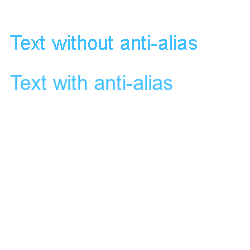
Anti-aliased text estimates partial edge coverage instead of switching whole pixels fully on or off. This matters because characters contain many small diagonals and curves that are easy for the eye to notice when they are jagged.
Glyph caching
Rendering every glyph from scratch for every draw would be too slow, so the library caches glyph bitmaps. Repeated strings therefore render much more efficiently after the first pass.
Changing the font matrix is a significant event because the old cached glyphs are no longer valid.
Kerning and advances
Characters are not placed at a fixed width. Each glyph has an advance, and some pairs of characters also have kerning adjustments.
Rotation flags and font matrices
Simple text rotation uses string_rotate_0, string_rotate_90, string_rotate_180, and string_rotate_270.
For arbitrary rotation or distortion, use jett::set_font_matrix() with an jett_matrix. The translation portion of the matrix is ignored for the font itself; position still comes from the x and y arguments passed to jett::text().

Measuring text
jett::size_text() measures the current text using the current font and matrix. Once the font is transformed, the measured extents differ from the untransformed version.
Colour and destination space
Text is drawn directly into the destination image, so the colour array you provide must already match the destination image’s colour model.
Practical advice
Use GDI fonts when you are already managing fonts elsewhere in Windows and only need the basic rotation flags.
Use FreeType fonts when you want anti-aliasing, arbitrary rotation, distortion, or a reproducible asset pipeline based on font files.